Algebraic expressions and multiplication: model algebraic expressions using algebra tiles (x², x, 1); combine like terms; calculate the product of two algebraic expressions piece by piece in a rectangle area model
With the algebraic expressions and multiplication simulation, you can visualize mathematical multiplication operations using algebra tiles and experience the algebraic expressions simulation. This interactive tool allows you to calculate polynomial multiplications piece by piece on a rectangular area model with the help of x squared, x, and 1 unit tiles. By working with negative coefficients and constant terms, you can improve your algebraic thinking skills and easily grasp the logic of combining like terms.
What can you do in this simulation?
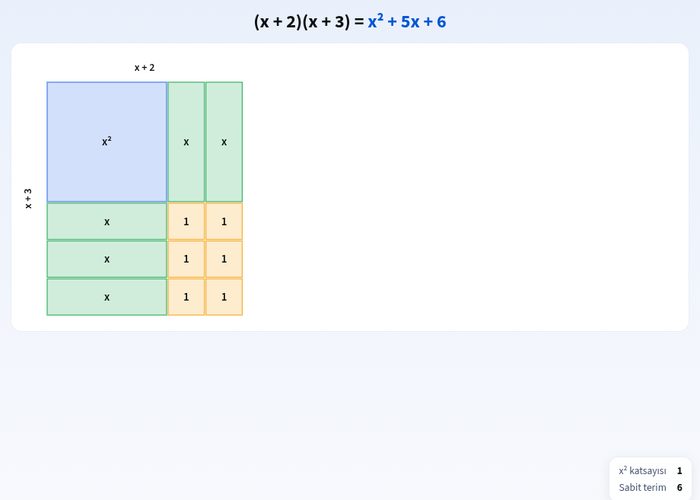
You can model the multiplication of two algebraic expressions using x squared, x, and 1 unit algebra tiles.
You can perform operations with negative constants and coefficients by observing the color changes of negative pieces (red boxes).
You can build the rectangular area model piece by piece and examine the x squared coefficient and constant term calculations.
You can check your steps and reach correct results by answering the guided questions.
You can practice by resetting the operations you performed through the experiment panel and setting up different algebraic expressions.
Basic concepts and formulas
Multiplication with algebraic expressions is fundamentally based on the distributive property. For example, the product of two binomials in the form of (ax + b)(cx + d) is expressed in the area model as the sum of four different parts: ac·x² + (ad + bc)·x + bd. Here, the x² term represents large squares, the x term represents rectangles, and the constant term (bd) represents small unit squares.
How to use?
Start building algebraic expressions by following the instructions given on the simulation screen.
Place the cards or tiles into the respective boxes and columns by dragging and dropping or tapping.
Observe how the area model changes by trying a negative constant or different coefficients.
Verify your answers by pressing the Check button and read the feedback from the Raista mascot.
Build a new expression using the Reset button and repeat the exercises.
Frequently asked questions
What do algebra tiles represent?
Algebra tiles make algebraic expressions tangible and provide a visual area model by representing areas of x squared, x, and 1 units.
Do colors change in expressions with negative coefficients?
Yes, in the simulation, negative pieces are shown as red-colored boxes, making it easier for you to follow subtraction operations.
What topics does this simulation cover?
The simulation covers the topics of multiplying with algebraic expressions, combining like terms, and area models in the Grade 8 mathematics curriculum.
 Interactive experiment